
2026 · completed · ios & android
Calo
Calo is an AI-powered calorie and nutrition journal built with Expo and React Native. Instead of manually searching foods, scanning barcodes, or logging macros, simply write what you ate.
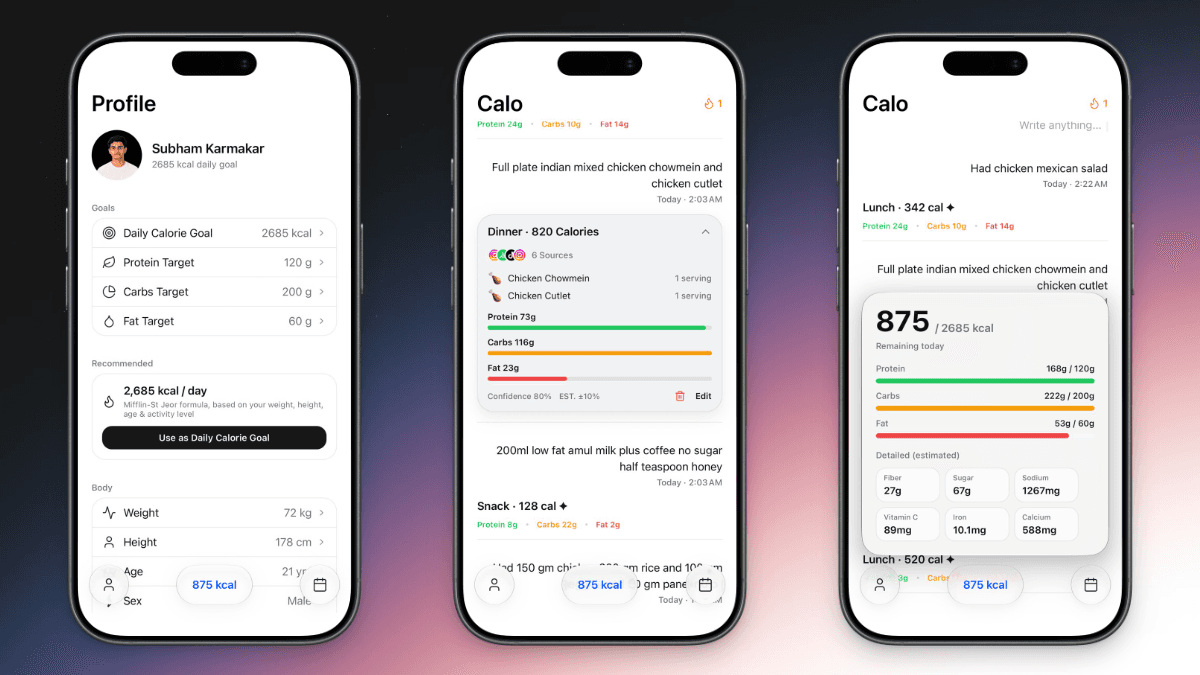
overview
Calo combines the simplicity of a notes application with AI-powered nutrition understanding. It converts natural meal descriptions into validated calorie and macro data, stores them locally, and presents them through a clean daily timeline.
The project demonstrates practical experience with React Native development, offline-first storage, AI provider integration, structured output validation, asynchronous state management, and mobile product design.
Its core value is not adding more nutrition features, but removing the friction that prevents people from tracking their meals consistently.
the problem
Traditional calorie-tracking applications often require users to search through food databases, scan barcodes, calculate portion sizes, and manually enter nutritional values.
This process is time-consuming and creates friction, especially for users who want to quickly record a meal without interrupting their routine. It can also discourage consistent logging because every meal requires multiple steps.
Calo solves this by allowing users to describe meals in natural language. The AI interprets the input, estimates nutritional values, and converts the result into structured data that the application can store and display.
The goal is to reduce meal logging from a multi-step form into a single natural sentence.
highlights
- Calo is a cross-platform mobile application designed to make calorie tracking feel as simple as writing a note.
- Instead of manually searching for foods, scanning barcodes, selecting portion sizes, or filling out multiple forms, users can describe what they ate in natural language. The AI processes the meal description and returns structured nutrition information such as calories, protein, carbohydrates, and fat. For example, a user can write: “For lunch, I had a chicken burger and fries.” Calo converts this into a structured meal entry, adds it to the daily timeline, updates the remaining calorie goal, and stores the result locally for future reference. The application is built with Expo and React Native to provide a native experience across iOS and Android. It follows an offline-first architecture using React Native MMKV for fast local storage, while TanStack React Query handles asynchronous state and API requests. The interface is intentionally minimal, calm, and content-focused. It takes inspiration from Apple Notes, Apple Health, Craft, Linear, and Notion Mobile, prioritizing whitespace, smooth interactions, and a native mobile feel. Natural-Language Food Logging Users can record meals by writing naturally instead of searching through food databases. AI Calorie Estimation The system estimates the total calorie value of a meal from the user’s description. Macro Estimation Meals are automatically broken down into protein, carbohydrates, and fat. Structured Nutrition Output AI responses are validated and converted into predictable data before being displayed. Daily Nutrition Timeline Food entries are organized chronologically in a clean, note-like timeline. Expandable Meal Cards Users can view a short meal summary or expand the card for more nutritional detail. Daily Calorie Goals The application tracks total consumption and calculates remaining calories. Calendar History Users can review previous meals and daily nutrition totals by date. Offline-First Storage Meal entries and application settings remain available locally without a constant internet connection. Cross-Platform Experience Calo is designed for both iOS and Android using a shared React Native codebase.
architecture
Calo follows a layered mobile architecture where the UI never communicates directly with the AI provider.
The React Native interface sends meal input through hooks and service functions. The nutrition service builds the prompt, selects the configured AI provider, and sends the request. The response is validated with Zod before it is stored in MMKV and displayed in the timeline.
This separation keeps the interface independent from provider-specific logic and ensures that only valid, structured nutrition data enters the application.
sequenceDiagram
    actor User
    participant UI as React Native UI
    participant State as Hooks and State
    participant Service as Nutrition Service
    participant AI as AI Provider
    participant Validator as Zod Validator
    participant Storage as MMKV Storage

    User->>UI: Enter meal description
    UI->>State: Submit meal form
    State->>Service: Process meal text

    Service->>Service: Build nutrition prompt
    Service->>AI: Request calorie and macro estimate
    AI-->>Service: Return structured response

    Service->>Validator: Validate nutrition data

    alt Response is valid
        Validator-->>Service: Return parsed meal
        Service->>Storage: Save meal entry
        Storage-->>Service: Confirm saved
        Service-->>State: Return nutrition result
        State-->>UI: Update timeline and daily totals
        UI-->>User: Show calories and macros
    else Response is invalid
        Validator-->>Service: Return validation error
        Service-->>State: Return failure state
        State-->>UI: Show retry or edit option
endchallenges
- 01
Converting Natural Language into Reliable Data
Users can describe the same food in many different ways, making the AI output unpredictable. How I tackled it: I used strict prompts and Zod schemas to validate calories, macros, meal type, and food items before saving the response.
- 02
Handling Inaccurate Nutrition Estimates
AI-generated nutrition values are estimates and may vary depending on portions or preparation methods. How I tackled it: I designed the values as editable estimates and kept the meal description visible so users can review and correct the result.
- 03
Supporting Multiple AI Providers
Different providers return different output and error formats. How I tackled it: I separated provider communication from the UI using a service layer and normalized each response into the same nutrition structure.
learnings
- Structured AI Output. I learned that AI responses should never be directly trusted by the interface and must be validated before use.
- Prompt-to-UI Pipelines. I gained experience converting unstructured user input into structured application data.